Connect LINE to your online store, once
It takes a few minutes to connect LINE to your online store. Add Tellsell as a friend in LINE, link your shop once, and your shop menu appears in the chat. No LINE OA to create, no code to type and nothing to set up in LINE.

How to connect LINE to your online store
You do it once when you open your shop. After that, you run the shop from LINE every day.
- 1
Open your shop at app.tellsell.app
Sign up and choose a shop name. Your shop gets its own address, yourshop.tellsell.app, straight away.
- 2
Add Tellsell as a friend
Scan the QR code on your account pages with LINE. Tellsell sends a Link button to the chat.
- 3
Tap Link
Your account pages open, where you are already logged in. Confirm once and your LINE is tied to your shop. No code to type.
- 4
The menu appears; start selling
The Tellsell menu appears at the bottom of the chat. Send a product photo with its name and price, and your first product is ready to check.
Linked through your account, not a code anyone can guess
Whoever links LINE to a shop sees its orders and buyers' addresses. So Tellsell links only through your account pages, where you are logged in. The link works once and expires quickly. If it expires, start again from your account pages.
- No 6-digit code for anyone to guess
- Each link works only once
- Payment settings change on the web only, never in chat
 Iced latte฿65On sale
 Coffee milk pour฿70On sale
 Medium roast 250 g฿3203 left
The shop menu appears, in your shop's language
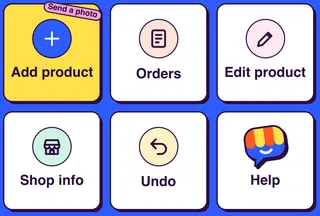
As soon as you are linked, a six-button menu appears at the bottom of the chat. A Thai shop gets the Thai menu; an English shop gets the English menu. If you run several shops, the menu adds a Switch shop button.
- Add product · Orders · Edit product
- Shop info · Undo · Help
- Tapping menu buttons never counts as an AI process

What you don't have to do
No LINE OA needed
No LINE Official Account for your shop, and no message plan to buy.
No new app
Use the LINE already on your phone, for you and your staff.
No menu to build
The menu is designed for you and appears once your shop is linked.
No codes to remember
You link through your logged-in account, so there is no code to remember or leak.
Questions
Can I use my personal LINE?
Yes. Link the LINE you already use. Tellsell only sees the messages you send to Tellsell, never your other chats.
Linking says it didn't work. What now?
For safety, the link expires quickly. Go to app.tellsell.app and start linking again.
I have several shops. Can I use one LINE?
Yes. Link each shop to the same LINE, then move between them with Switch shop in the menu.
How do staff link?
Invite them from your account pages. They add Tellsell as a friend and link the same way, with the staff role.
Do buyers see this chat?
No. The chat is only for you and your team. Buyers shop on your web shop.
Read next
Your shop, ready to sell in minutes
Open a free shop. Run it from the LINE you already use, with a web dashboard too.