Let staff manage your shop in LINE, from their own phone
Let staff manage your shop in LINE without sharing a password or handing over your phone. Staff add products and handle orders from their own LINE, while the important decisions stay with the owner.


What staff can do
Staff link their own LINE to your shop and use the same menu as the owner. They can help with nearly all of the day-to-day work.
- Add new products and edit products
- Set stock and mark items sold out
- View slips and tap Paid, Shipped or Cancel

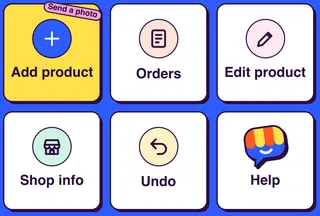
The important things stay with the owner
Only owners delete products, change the shop info and About page, and use Undo. If staff try, Tellsell replies like this.
- Deleting products
- Shop info and the About page
- Undoing changes
- Payments, delivery and staff, set on the web
LINE users per shop: Business 3 · Pro 10
The owner is included. Free and Starter have 1 LINE user, the owner. If you want staff to help, choose Business or Pro.
Let staff manage your shop in LINE in 3 steps
- 1
Invite from your account pages
Invite staff from your shop's account pages at app.tellsell.app.
- 2
Staff add Tellsell as a friend
Staff use their own LINE, add Tellsell as a friend and link to the shop from the invitation.
- 3
They can start helping
Tellsell confirms they are linked as staff, and the shop menu appears in their chat straight away.
Questions
Do staff get order alerts?
Instant LINE alerts go to the shop owner. Staff can open orders any time with the Orders button in the menu.
Can staff change payment settings?
No. Nobody can change payments in the chat. Payments, delivery and staff are set only on the web at app.tellsell.app.
Do products added by staff count as updates?
Yes, the same as when the owner adds them. Everyone in the shop uses the same plan's updates.
What if someone leaves?
Remove them on your account pages, and their LINE can no longer manage the shop.
Read next
Your shop, ready to sell in minutes
Open a free shop. Run it from the LINE you already use, with a web dashboard too.